
Outdated or Unsupported Browser Detected
DWD's website uses the latest technology. This makes our site faster and easier to use across all devices. Unfortunatley, your browser is out of date and is not supported. An update is not required, but it is strongly recommended to improve your browsing experience. To update Internet Explorer to Microsoft Edge visit their website.

Sign up for updates from DVR
Need an Alternate Format?
If you have comments regarding any documents on DVR's website or need an alternate format, you may contact us via email at: dvr@dwd.wisconsin.gov
Or you can reach us by phone at: 800-442-3477 (Toll Free)
Updated: May 2026
Reports can be submitted to DVR using several methods. The methods below are listed in order of preference:
Whenever possible, Service Providers should upload reports directly through the Service Provider Portal. This method allows DVR staff to access the report immediately and allows providers to view reports attached to the case.
Reports submitted using the URL, fax, or email methods are processed through DVR's scanning system and then attached to the consumer's case file in IRIS.
Service Providers are encouraged to upload reports directly to the consumer's case file using the Attachments tab in the Service Provider Portal.
Enter the Report Year and Report Month.
Note: The Report Month should reflect the month being reported on, not the month the report is submitted.
Users can view reports uploaded through the portal as long as they have access to the case. This is also where providers will find reports that DVR has shared with them. Reports shared by DVR will not have the checkbox "Uploaded by Service Provider" selected. Service Providers cannot delete reports once uploaded. If a report is attached in error, contact the DVR case facilitator for approval. The request will then be forwarded for removal.
Reports can also be submitted using DVR's URL upload system. Reports submitted using this method are processed through DVR's scanning system and attached to the consumer's case file in IRIS. Reports with or without headers can be submitted using this method.
Step 1: Set Up Access to the Service Provider Portal
The main contact and personnel assigned an Administrator role can log into the Service Provider Portal to verify that the Scanning role has been assigned to personnel who will submit reports.
If the personnel submitting reports does not have portal access:
Once the request is received, the DVR Contract Specialist will contact the organization's main contact to confirm approval of the personnel's access.
Step 2: Access the File Upload Page
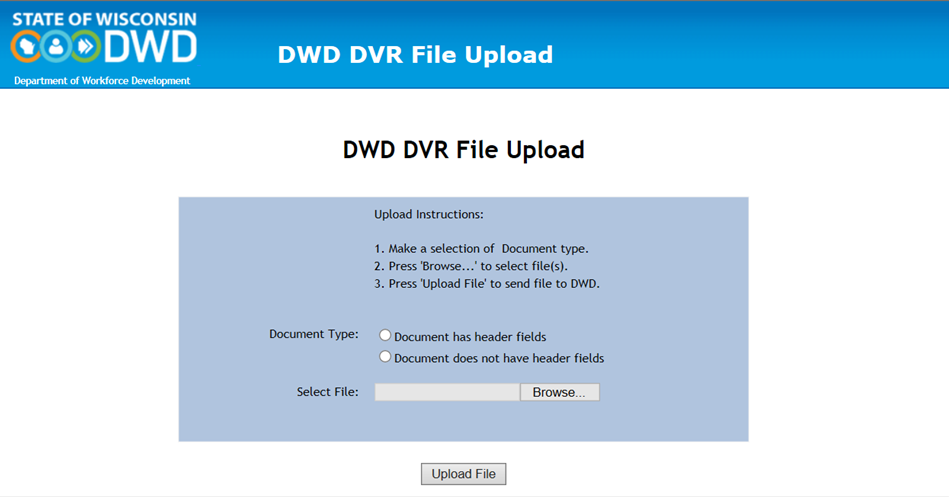
Go to the DVR File Upload page and log in using your Service Provider Portal credentials.
Note: You may need to enter the prefix WIEXT\ before username when logging in.
Step 3: Upload the Report
After logging in:
Fax Number (Header Required): 608-327-6014
Legacy Fax Number (No Header Required): 888-693-3479
Note: Reports submitted using this method must be manually attached to the IRIS case file by DVR staff.
Send an email with the report attached to: DVRSCAN@dwd.wisconsin.gov.
Note: Reports submitted using this method must be manually attached to the IRIS case file by DVR staff.
Use the correct abbreviated Service Provider name created by your organization.
Note: The abbreviation (up to 10-characters) can be found under the Service Provider tab in the Service Provider Portal.
The flowchart below summarizes how reports submitted using DVR's scanning methods are processed and attached to consumer case files.
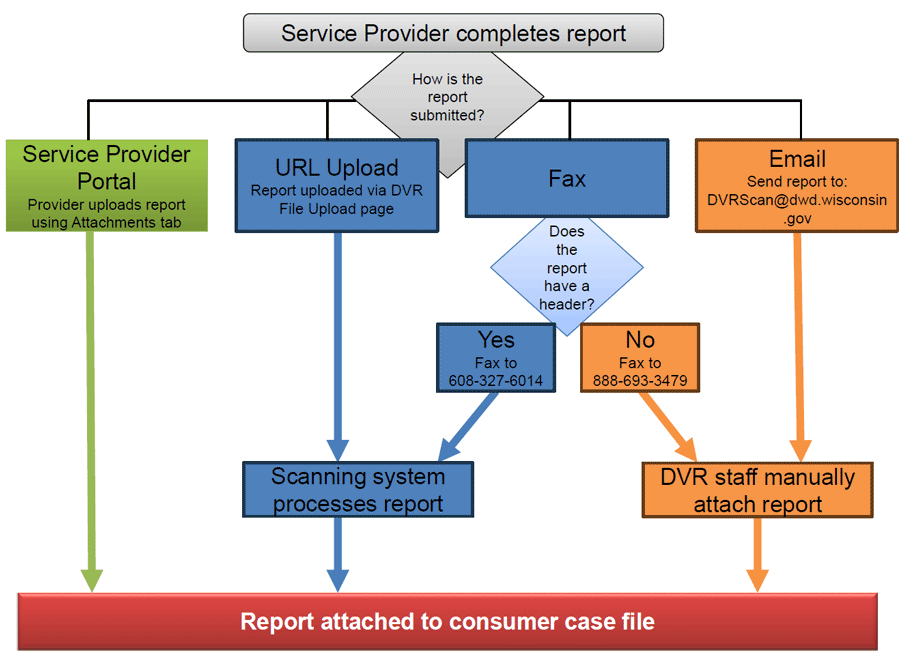
Service Providers should upload reports directly through the Service Provider Portal whenever possible.
DWD Contact Information
201 E. Washington Ave
P.O. Box 7946
Madison, WI 53707
(608) 266-3131
Sign up for DWD news and updates


A proud partner of the  network